
Social Workflows
What to Post on Facebook: A Weekly Mix for Small Brands
A one-person product shop does not need a big content plan for Facebook. Pick a few post types that suit the page, set a small weekly mix, and draft and approve it before anything goes live.
Kushal Shrestha
Marketing & Engineering
9 min read

In short
- Post a small, steady mix of five types: product, behind the scenes, answers to customer questions, customer moments and plain updates.
- A Facebook page for a product shop works like a shop window and a noticeboard, so keep posts useful and easy to act on.
- Choose a weekly mix you can keep, such as three posts, and write down which type goes on which day.
- Draft the week in one sitting, then review each post against a short checklist before it goes out.
- Keep an approval step between the draft and the post so nothing goes live that you have not read.
For a one-person product shop, the answer to "what to post on Facebook" is a small, steady mix of five post types: the product itself, behind the scenes, answers to customer questions, customer moments and plain updates. Aim for a few posts a week, draft them together, and review each one before it goes out. This article is for owners of small product brands who run the whole shop and need a Facebook routine that fits into an ordinary week.
You will leave with the five types, a simple weekly mix, a checklist for each draft and a hypothetical week to copy.
Think of the page as a shop window and a noticeboard
A Facebook page for a product shop does two jobs. It shows what you sell, like a window. It also holds the practical news a customer might look for, like a noticeboard: opening times, shipping dates, a restock, a market stall.
That framing helps you decide what belongs. A post earns its place if it helps someone understand the product, trust the shop or take the next step. A post that exists only because the page felt quiet does not.
It also means the page does not need to copy every idea from your other channels. Some posts will travel well between places, and some will not. Start from the people who might look at the page and what the reader would want to know.
Five content types that suit a product shop
These five cover most of what a small shop has to say. Each is easy to produce from things you already have: photos, packing-table moments, questions in your inbox.
1. The product, shown clearly
A clear photo, one or two sentences about what it is and who it suits, and a plain way to find it. Name the scent, the size, the ingredient list, the material, whatever a buyer would ask first. Skip hype words. If a claim needs a source or a rule applies to your category (beauty, food, supplements), keep the wording you already use on your product page.
2. Behind the scenes
Show how the thing is made, packed or sourced: a batch cooling, a table of orders waiting for labels, a tool you use every day. Keep it honest and ordinary. The point is that a real person runs the shop.
3. Answers to customer questions
Every inbox holds a list of repeat questions: how long does shipping take, what is this made from, how do I store it, can I use it as a gift. Each one is a post. Answer it directly in the first sentence, then add a detail or two. These posts are useful to someone who has not yet asked.
4. Customer moments
A photo a customer sent, a kind message, a gift that was wrapped well. Ask permission before sharing anything from a customer, and share only what the customer agreed to. If you have no customer moments yet, skip this type for now instead of inventing one.
5. Plain updates
Restocks, shipping cut-off dates, market days, a short break, a new size. These are the noticeboard posts. They are short and factual, and they save you from answering the same message over and over.
| Post type | What it does | Where the material comes from |
|---|---|---|
| Product | Shows what you sell and who it suits | Your product photos and page |
| Behind the scenes | Shows the person and process | Your packing table, workshop or kitchen |
| Customer questions | Answers what buyers ask before buying | Your inbox and comments |
| Customer moments | Shows the product in someone's life | Messages you have permission to share |
| Plain updates | Shares practical news | Your calendar and stock notes |
A simple weekly mix you can keep
A mix is a plan for types, not a promise of a number. Choose a count that fits your week. For many owners, three posts is a place to start. Fewer posts you actually publish beat a grand plan you abandon by Wednesday.
Here is one way to spread three posts:
| Day | Post type | Example |
|---|---|---|
| Early in the week | Customer question | Answer one repeat question from your inbox |
| Midweek | Product | One product, one clear photo, one plain caption |
| Late in the week | Behind the scenes or update | Packing table photo, or a shipping or restock note |
If you can manage more, add a customer moment or a second product post. If you manage less, keep the product post and drop the rest. Over a month, rotate which products and which questions you cover so the page does not repeat itself.
Write the mix in a notebook as a short list of days and types. That list is the plan. The posts themselves come next.
If your cadence is still unsettled, how often a one-person beauty brand should post on Instagram walks through choosing a rhythm you can keep. The reasoning carries over to a Facebook page, so read it and adjust for your shop.
Draft the week in one sitting
Writing one post at a time, every day, is what makes a page go quiet. Writing the whole week once is easier, because you stay in the same frame of mind and the posts fit together.
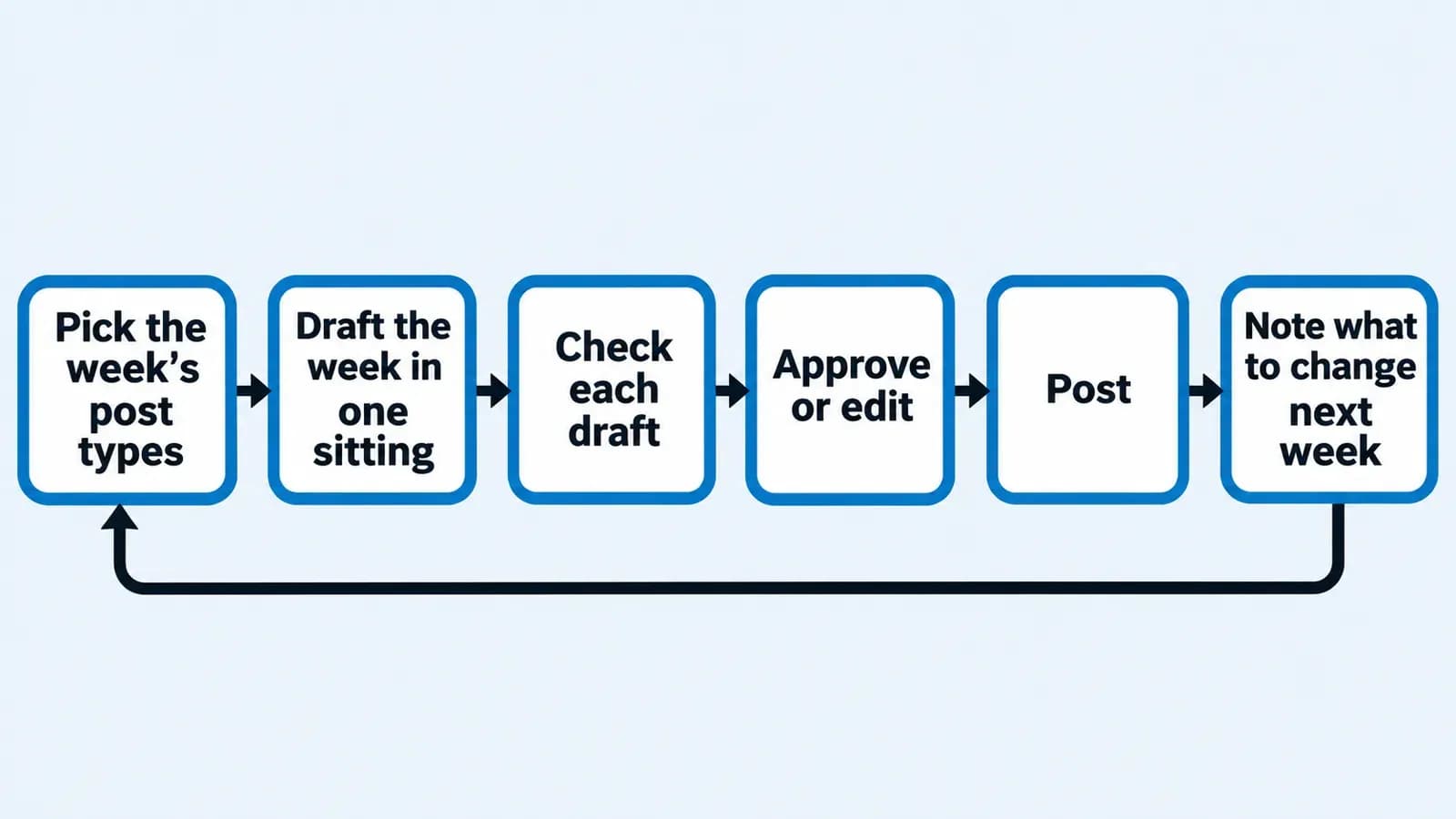
A routine that works for a one-person shop:
- Pick the week's post types from your list of days and types.
- Gather the material. Photos, the customer question, the restock date.
- Draft every post in one sitting, even if rough.
- Check each draft against the checklist below.
- Approve or edit. Nothing goes out until you have read it and agreed.
- Post, then jot a line on what you would change next week.
A draft can come from you, from a notes file or from a tool. Youanai Social builds a Business DNA profile from your website, capturing brand voice and offer rules, and drafts post ideas and copy from it. Every draft waits for your approval, and you decide what to use and where to post it. There is a free way to start.
If you run short of material, AI social media post ideas from what you sell shows how to turn products into ideas, and how to fill an empty content calendar as a one-person ecommerce brand helps when the plan has gaps.
A checklist for each draft
Run every draft through the same short checks before approving it:
- Does the first sentence say the point? A reader scrolling past should get it quickly.
- Is the product named plainly? Name, size, scent or material, with no filler.
- Is there one clear next step? Visit the shop, read the details, send a message. One, not three.
- Is every claim safe to make? No health, result or comparison claims you cannot back up. If unsure, cut it.
- Does it sound like the shop? Read it aloud. If it sounds like an advert for someone else, rewrite it.
- Is a customer's name, photo or message used with permission?
A repeatable approval step is what keeps a drafted week from slipping out with a mistake in it. Approve to ship for one-person ecommerce social shows one way to set the routine up.
Worked example (hypothetical)
This example is hypothetical, with an invented brand, to show the mix in action. It contains no real results and none are claimed.
Imagine a hypothetical one-person candle shop. The owner chooses three posts for the week.
Early in the week, a customer question. A buyer has asked twice how long a candle lasts and how to trim the wick. The owner drafts a short post that answers the care question in the first sentence, then adds two plain tips. A photo of a trimmed wick goes with it.
Midweek, a product post. One candle, one clear photo on a plain background, a caption with the scent notes, the size and what the candle suits. A single sentence points to the product page.
Late in the week, a plain update. A note that the next batch is poured and orders placed before a stated date will ship together. A packing table photo is attached.
Review. The owner reads each draft against the checklist, trims a sentence of hype from the product post and approves all three. At the end of the week, one line goes in the notebook: the question post was quick to write, so next week gets two of those.
Common mistakes with Facebook posting
- Posting only product photos. A page that only sells is hard to care about. The mix of five types exists to prevent that.
- Planning more than you can write. Pick a count you can keep, then raise it only when the routine feels easy.
- Skipping the plain updates. Shipping dates and restock notes feel dull to write, yet they answer real questions.
- Sharing customer content without asking. Always get a clear yes first.
- Writing in a voice that is not yours. Keep to the tone of your product pages, so the page and the shop feel like the same place.
- Posting without a read-through. Drafting ahead is only safe if an approval step sits between the draft and the post.
FAQ
What should a small business post on Facebook?
Post a small mix of product posts, behind the scenes, answers to customer questions, customer moments and plain updates. Each one should help a reader understand the product, trust the shop or take a next step.
How often should a small product shop post on Facebook?
Choose a count you can keep every week, and treat three posts as a place to start. A steady, smaller routine is better than a bigger plan that stops after a few days.
What are good Facebook post ideas for an ecommerce brand?
Answer a repeat customer question, show one product clearly, share a packing table photo, post a shipping or restock note, or share a customer message with permission. Your inbox and your product pages are the best sources.
Do I need to post something different from other channels?
Not always. Some posts travel well between places, but start from what a reader of your Facebook page would want to know, and adjust the wording and photo to fit.
How do I avoid posting something I regret?
Draft ahead, then review each post with a short checklist and approve it before it goes out. Keeping an approval step between the draft and the post catches wording, claim and permission mistakes.
Can AI write my Facebook posts?
A tool can draft post ideas and copy, but you should read and approve every draft before using it. Youanai Social builds a Business DNA profile from your website and drafts social posts from it, and every draft waits for your approval before anything is posted.
How long does it take to plan a week of posts?
Plan for one sitting. Pick the types, gather the photos and facts, draft everything, then review. The time varies by shop, so note how long it takes the first week and adjust the number of posts to match.
Keep reading
Instagram Collab Post: How Two Small Shops Co-Post

A collab post puts two shops in front of each other's audiences, but only if the idea, the wording and the sign-off…

10 min read
Starting a Candle Business: Social Media for Your First 90 Days

A three-phase plan for the first 90 days of a candle brand: what to post before launch, how to photograph candles with…

10 min read
Later Alternative: Buffer vs Later for Small Product Shops

A plain look at Later and Buffer for an owner-run shop: what each plan lists, what each costs as of 2026-11-03, and…
10 min read