
Social Workflows
Later Alternative: Buffer vs Later for Small Product Shops
A plain look at Later and Buffer for an owner-run shop: what each plan lists, what each costs as of 2026-11-03, and when a different kind of tool, one that drafts from your website, fits better.
Aayush Lamichhane
Founder & CEO
10 min read

In short
- Buffer is the closest Later alternative if you write your own posts and want a scheduler: it has a free plan for up to 3 channels, and Later lists only a 14-day trial.
- Later lists Link in Bio, a mobile app and AI caption credits on every plan. Buffer prices per channel, Later per plan.
- Approvals are listed on Later from Growth up and on Buffer's Team plan, so a solo owner may not need either.
- Youanai Social is a different kind of tool: it builds a Business DNA profile from your website, drafts posts, and waits for your approval before anything posts.
- Prices read 2026-11-03 on each vendor's own page. Check the pages before you decide.
If you are looking for a Later alternative as an owner-run product shop, Buffer is the closest like-for-like scheduler, and it has a free plan where Later lists only a 14-day trial. Later lists more built-in extras on every plan, and Buffer charges per channel. A third option is a tool that drafts the posts for you from your website, which is where Youanai Social fits. This article is for owners of small product brands who are also the whole marketing team and want a straight comparison. Prices were read on 2026-11-03 on each vendor's own page.
You will leave with a table, a short list of questions that decide the choice, and an honest view of where each option fits.
What the comparison covers, and what it does not
Everything about Later and Buffer below comes from the two vendors' own pricing pages, read on 2026-11-03: Later pricing and Buffer pricing. Later's help center returned an error when read, so no help-page details are used. Prices change, so treat every figure as "as listed on 2026-11-03" and check the page before you buy.
Some things were not read, and this article does not guess at them. Later's monthly-billed prices were not printed in the page text that was read, so only yearly-billed prices appear here. Any claim about how well either tool works day to day is also left out, because a pricing page cannot show that.
Later at a glance
Later has three plans: Starter, Growth and Scale. The page lists no free plan. Every plan offers a 14-day free trial (Later pricing).
- Starter: $18.75 USD a month, billed yearly. One social set, which is one profile from each supported platform, and one user. Scheduled posts are counted when scheduled, up to 30 per profile per month.
- Growth: $37.50 USD a month, billed yearly. Two social sets, two users and up to 180 scheduled posts per profile per month. Approvals, a social inbox and custom roles are listed from this plan up.
- Scale: $82.50 USD a month, billed yearly. Six social sets, four users and unlimited scheduled posts.
Each yearly price is shown as "3 months free | 25% off" against paying monthly, and taxes are extra. Later supports Instagram, Facebook, TikTok, Threads, YouTube, Pinterest, LinkedIn and Snapchat.
All three plans list Link in Bio, an iOS and Android app, unlimited media storage and AI tools. The AI tools are a Caption Writer and an Ideas feature, with a monthly credit allowance of 5 on Starter, 50 on Growth and 100 on Scale. One credit generates one caption or three ideas.
Buffer at a glance
Buffer prices per connected channel, meaning one social account such as one Instagram profile (Buffer pricing). It has three plans: Free, Essentials and Team.
- Free: $0 a month. Up to 3 channels, 10 scheduled posts per channel at a time (refilling as posts publish), 100 ideas, one user and unlimited drafts. The AI Assistant and 30 days of insights are included.
- Essentials: from $6 a month per channel on monthly billing, or $5 per channel a month billed yearly. Unlimited scheduled posts per channel under a fair use policy, advanced analytics, a hashtag manager and first comment scheduling. It offers a 14-day free trial.
- Team: from $12 a month per channel monthly, or $10 per channel a month billed yearly. Everything in Essentials plus unlimited team members, access levels and content approval workflows.
Buffer lists many channels: Bluesky, Facebook pages, Google Business Profile, Instagram business and creator accounts, LinkedIn, Mastodon, Pinterest, Threads, TikTok business, YouTube and X. One detail from the page: moving from Free to a paid plan means paying for every channel, including the three that were free.
Buffer vs Later side by side
The table puts the listed facts next to each other. Where a cell says "not listed", the page read did not show it, which is different from saying the tool lacks it.
| Later | Buffer | |
|---|---|---|
| Free plan | None listed; 14-day trial on every plan | Yes, $0 for up to 3 channels |
| Entry paid price (yearly billing) | Starter $18.75 USD a month per plan | Essentials $5 a month per channel |
| How price scales | By plan, with social sets and users | By number of channels |
| One Instagram profile, yearly billing | $18.75 a month (Starter) | $5 a month (Essentials) |
| Three channels, yearly billing | Starter covers one set; each set holds one profile per platform | $15 a month (Essentials) |
| Scheduled post limit | 30 per profile per month on Starter | 10 per channel at a time on Free; unlimited under fair use on paid plans |
| Users | 1 on Starter, 2 on Growth, 4 on Scale | 1 on Free and Essentials; unlimited on Team |
| Approval workflows | Listed from Growth up | Listed on Team |
| AI writing help | Caption Writer and Ideas, credit-limited by plan | AI Assistant on every plan |
| Link in bio | Link in Bio on all plans | Start Page on all plans; comparison not available |
| Mobile app | iOS and Android on all plans | Not listed in the page read |
Sources: Later pricing, Buffer pricing, prices read 2026-11-03.
A few honest readings of the table. For one Instagram profile and nothing else, the listed yearly prices are $18.75 a month at Later and $5 a month at Buffer, so Buffer costs less on paper. Later's price covers a whole social set, so the gap may narrow if you run several platforms, but compare against your own channel list rather than a general rule. Buffer's free plan is the only free scheduler plan of the two, and it costs nothing to try.
On the other side, Later lists a mobile app, Link in Bio with email collection and a monthly AI credit allowance on its cheapest plan. If those extras matter, the higher base price may be fair.
Which one fits a solo product shop
Run through these questions in order and stop at the first one that settles it.
- Do you want to pay nothing while you learn what you need? Buffer's free plan allows up to 3 channels. Later lists a trial only.
- Do you need a link-in-bio page with an email form? Later lists Link in Bio with an email collection form on every plan. Buffer lists a Start Page, but how the two compare is not known from the pages read.
- Do you post on platforms beyond Instagram and Facebook? Check each vendor's channel list against yours. Later lists eight platforms and Buffer lists a longer set that includes Bluesky, Mastodon and Google Business Profile.
- Does someone else need to approve posts? Approvals are listed on Later's Growth plan and Buffer's Team plan. A solo owner who signs off alone may not need to pay for this.
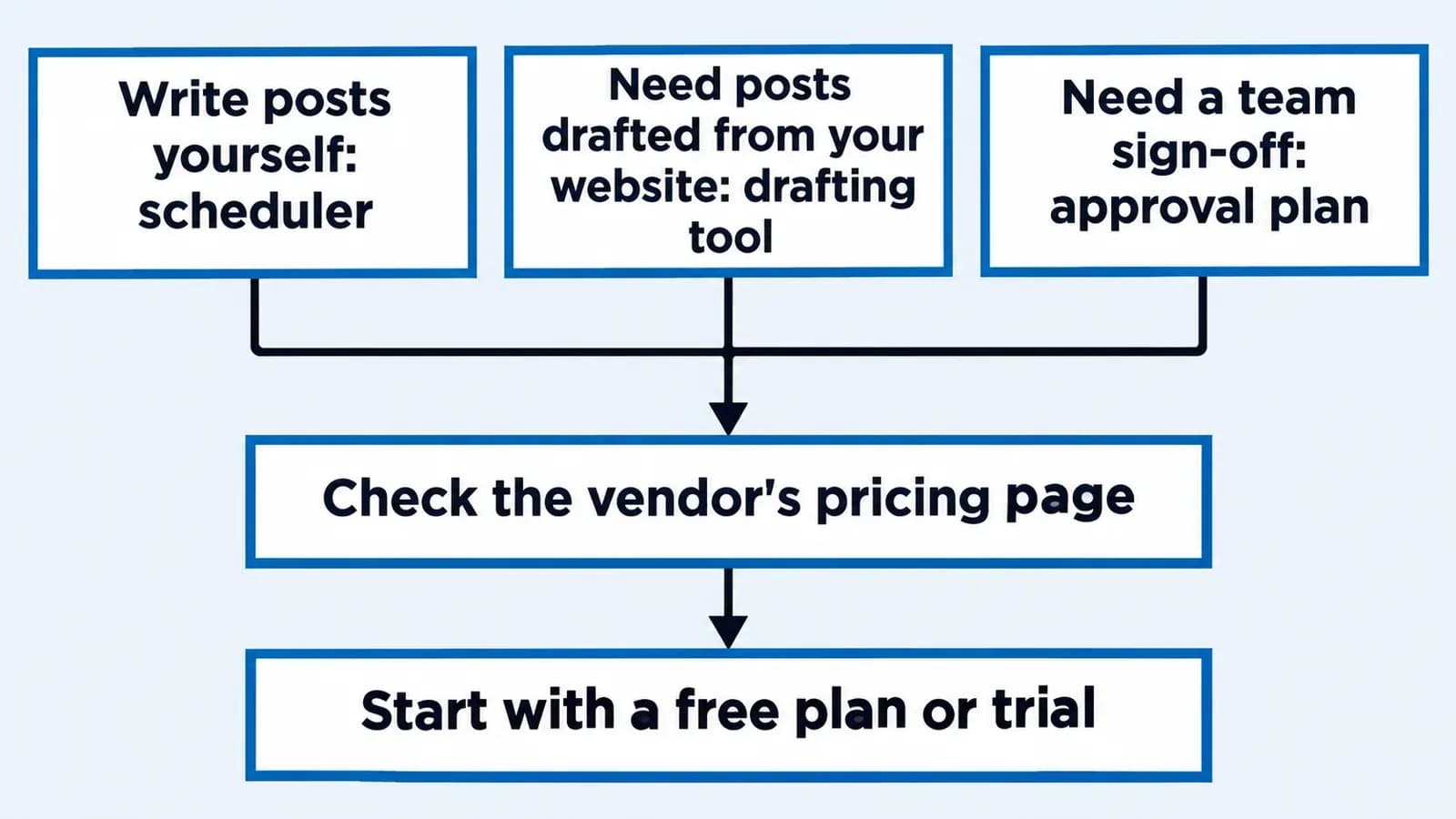
- Will you write every caption yourself? If yes, a scheduler is the right category. If the blank page is the real problem, keep reading.
Where Youanai Social fits, and where it does not
A scheduler solves "when and where does this go out". It does not solve "what do I say this week". For many owner-run shops that second problem is the one that stalls the calendar. If that sounds familiar, how to fill an empty content calendar as a one-person ecommerce brand covers the cause in more depth.
Youanai Social works differently from both tools above. It builds a Business DNA profile from your website, capturing brand voice and offer rules, then drafts social posts from that profile. Every draft waits for your approval before anything is posted. There is a free way to start. If you want to see the idea in practice, turning a product page into an Instagram week walks through it, and approve to ship for one-person ecommerce social shows how the approval step works.
It is not a claim that Youanai Social replaces a scheduler for everyone. This article does not compare its prices, plan limits or full list of platforms against Later or Buffer, and none of that is stated here. If your need is purely scheduling posts you have already written, Buffer's free plan is a sensible place to start. If your need is drafts that sound like your brand and stay under your sign-off, a drafting tool is the closer match.
A hypothetical example
Consider a hypothetical one-person specialty tea shop with a small Instagram following. The owner has the product photos but struggles to write captions, and posts only when there is time.
The owner first asks the five questions above. There is no team, so approvals are not needed. Link in bio matters a little. The honest answer to the last question is that writing captions is the real bottleneck.
A scheduler alone would give the owner a tidy queue with nothing in it. So the owner makes two choices. For scheduling, the free Buffer plan is enough to try. For the blank page, the owner tries Youanai Social: the Business DNA profile is built from the shop's website, drafts appear, and each one waits for the owner's approval before anything goes out.
This is a hypothetical, with no results attached. It shows how to match the tool to the actual bottleneck, not which tool wins.
How to decide without a long trial
- List your channels. Count the accounts you will actually post to this quarter, not every account you own.
- Price your own case. Work out the yearly cost for those channels on each pricing page, using the yearly or monthly figure you would really pay.
- Use the free options. Buffer's free plan and the free start at Youanai Social cost nothing. Later's 14-day trial is the route to test Later.
- Test one week. Plan one real week of posts in whichever tool you pick and note how long it took.
- Recheck later. Plans change. If a limit starts to hurt, such as the 30 scheduled posts per profile on Later's Starter plan or the 10 scheduled posts on Buffer Free, revisit the pages.
If you also want to know how often to post before you choose a plan, how often a one-person beauty brand should post on Instagram gives a framework that applies beyond beauty.
FAQ
What is the best Later alternative for a small shop?
It depends on the job. For scheduling posts you write yourself, Buffer is the closest like-for-like option and lists a free plan. For drafts built from your website with approval before posting, Youanai Social is a different kind of tool. Compare against the pricing pages, read 2026-11-03.
Is Buffer cheaper than Later?
On the listed yearly prices, one Buffer Essentials channel is $5 a month and Later Starter is $18.75 a month, as of 2026-11-03. The two price differently, by channel at Buffer and by plan at Later, so work out your own channel count.
Does Later have a free plan?
None is listed on the pricing page read on 2026-11-03. Each plan shows a 14-day free trial. Check Later pricing for the current offer.
Does Buffer have a free plan?
Yes. The Free plan is $0 for up to 3 channels, with 10 scheduled posts per channel at a time, as listed on 2026-11-03. See Buffer pricing.
Do I need approval workflows as a solo owner?
Probably not, if you are the only person signing off. Approvals are listed from Later's Growth plan and on Buffer's Team plan, so paying for them only makes sense when someone else must review posts. Youanai Social also holds every draft for your approval before anything posts.
Where does Youanai Social fit next to Buffer and Later?
It handles the drafting step. It builds a Business DNA profile from your website, drafts posts from it, and waits for your approval before anything is posted. It does not claim to match every feature of a scheduler.
Can I use a scheduler and a drafting tool together?
Nothing on the pages read says otherwise, but this article does not cover how any two tools work together. Check each tool's own documentation before relying on a combined setup.
Keep reading
Best Time to Post on Social Media: A Test for Small Brands

Skip the generic posting-time charts. Start with what your own account shows, then run a small, fair test of three time slots…

10 min read
Content Calendar in Google Sheets: Columns and Sample Week

A content calendar for a one-person product brand fits in one Google Sheets tab. See the exact column layout, a filled hypothetical…
9 min read
Instagram Comment Ideas for Small Product Brands

Reply examples for the comments a small product brand actually gets, from ingredient questions to public complaints, plus honest ways to invite…

10 min read