
Social Workflows
Best Time to Post on Social Media: A Test for Small Brands
Skip the generic posting-time charts. Start with what your own account shows, then run a small, fair test of three time slots that one person can finish without extra tools.
Aayush Lamichhane
Founder & CEO
10 min read

In short
- No universal best time to post exists. The best time for your brand is the one your own results show.
- Look at your own account first: when your followers seem active, and when your past posts got the most response.
- Test three time slots with similar posts, one change at a time, and keep a simple log.
- Judge each slot on the measure that matches your goal, and repeat the test before you change your routine.
- Pick a rhythm you can keep. A time you can hit every week beats a perfect time you miss.
There is no universal best time to post on social media. The best time for your brand is the one your own results point to, confirmed by a small test you run yourself. Start with what you already know about your account, pick three time slots, post similar content in each, log what happens, and compare on one measure. This article is for owners of small product brands who are also the whole marketing team and have no spare hours for a research project.
You will leave with a short routine: where to look, how to set up a fair test, and how to decide what to keep.
Why a generic "best time" does not exist
Posting-time charts are tempting because they promise a shortcut. The trouble is that they describe other people's accounts, and yours may not behave like theirs. For example, a hypothetical candle shop with local buyers and a hypothetical skincare maker with an audience in several countries can have very different patterns.
Several things change the answer for a specific brand:
- Who follows you. Time zones, jobs, school runs and shift patterns all shape when followers open the app.
- What you sell. A product bought as a gift can behave differently from one bought as a routine refill.
- What you post. A quick photo and a longer how-to may be read at different moments of the day.
- Your format. Different formats may be seen at different moments.
So treat any number or hour you read elsewhere as a guess about someone else. This article does not give one, on purpose. It gives a way to find yours.
Start with your own analytics
Before running anything, look at what you already know about your account and your past posts.
Two questions are worth answering:
- When are your followers around? Think about the broad pattern, such as "weekday evenings look busier than mornings", not an exact minute.
- Which of your past posts did best, and when were they posted? Line up recent posts by the measure you care about, then look at the posting time of the top few and the bottom few. Do patterns show up, or does the content explain the gap better than the clock?
Write the findings in a notebook or a note on your phone. This takes one sitting and costs nothing.
A word of caution: a small account has little data, and a few posts can mislead. If your follower count is small, or you have posted irregularly, treat the first look as a starting guess, not a verdict. That is exactly why a test comes next.
If your cadence itself is still unsettled, settle that first. A steady rhythm gives you cleaner data than a scattered one, and how often a one-person beauty brand should post on Instagram walks through choosing one you can keep.
What to measure, matched to your goal
"Did it do well" means different things for different brands. Pick one measure before the test starts, so the result cannot be bent to fit afterwards.
| Your goal | A measure to watch | Where to look |
|---|---|---|
| More people see the post | How many people saw it | Whatever figures you can see for each post |
| People engage with the content | Saves, shares and comments | Whatever figures you can see for each post |
| Conversation with customers | Replies and direct messages | Inbox and comments |
| Visits to your shop | Visits that follow a post | Your shop's own traffic records |
| Sales | Orders that follow a post | Your shop's own order data |
Pick the one that matches what the posts are for. If the goal is orders, views alone can look good while nothing sells. Be careful with sales especially: an order after a post does not prove the post caused it, so use it as a hint and not as proof.
A simple test plan for a one-person shop
The plan below needs no extra tools. It asks for a notebook or a spreadsheet and the willingness to leave the plan alone for a few weeks.
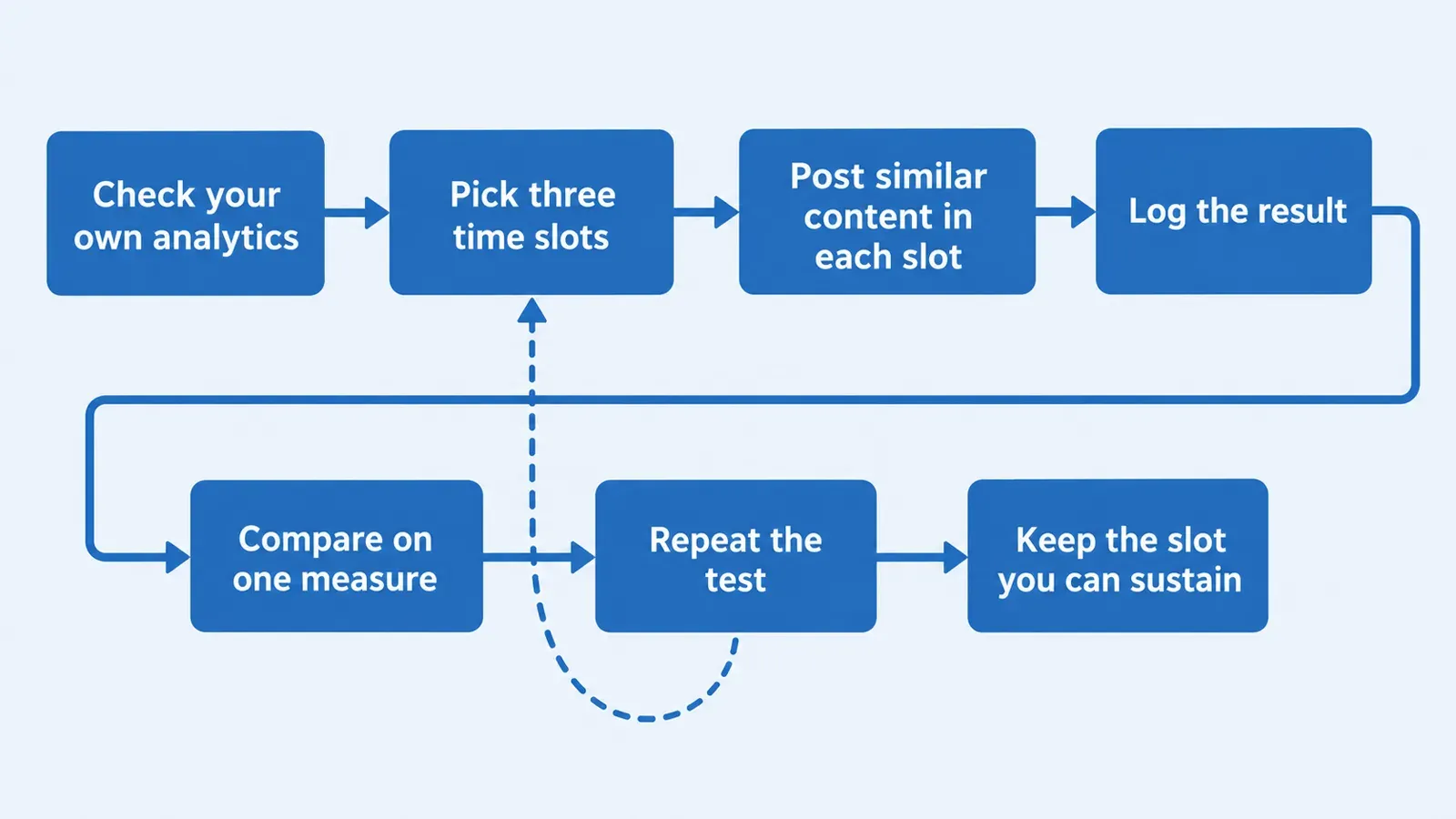
Step 1: Choose three time slots
Use your notes from the earlier section to choose three slots that differ clearly from each other, for example a morning slot, a lunchtime slot and an evening slot. Make them different enough that a difference could show. Choose slots you can actually hit, because a plan that needs a 6 a.m. alarm will not survive a busy week.
Step 2: Keep the content comparable
Time is the one thing you want to change. So keep the rest similar:
- Use the same kind of post in each slot, for example a product photo with a short caption.
- Keep the caption length and style close.
- Avoid putting a launch, a sale announcement or a big reveal into only one slot, because the news, not the hour, would win.
Rotate the slots across days, so that one slot is not always on a Friday and another always on a Monday. Otherwise day and time get mixed together.
Step 3: Run it long enough to be fair
One post per slot tells you almost nothing, because one post can succeed or fail for reasons unrelated to timing. Plan several posts in each slot across a few weeks. How many depends on how often you post: a brand that posts a few times a week needs more weeks than one posting daily. Write the planned end date at the top of the notebook before you start.
Step 4: Log every post
Keep a short log. One row per post is enough:
| Date | Slot | Post type | Measure (chosen in advance) | Notes |
|---|---|---|---|---|
| (date) | Morning, lunchtime or evening | (e.g. product photo) | (your chosen number) | Anything unusual: a holiday, a shared post, a broken link |
The notes column matters more than it looks. A post that was shared by a larger account, or that went out on a public holiday, should be flagged so it does not distort the comparison.
Step 5: Compare and decide
At the end date, compare slots on the single measure you chose. Look for a gap that shows up repeatedly, not a single standout post. If the slots look about the same, that is a result too: it may mean timing is not your biggest lever, and effort may be better spent on what you post.
Step 6: Repeat before you commit
Audiences can shift with seasons, school terms and your own content. Treat the result as "what held for this period". Repeat the test later, or run a quick check each season, before rebuilding your routine around one slot.
Worked example (hypothetical)
This example is hypothetical, with an invented brand, to show the steps. It contains no real results and none are claimed.
Imagine a hypothetical one-person candle brand. The owner reviews past posts and notices that followers seem more active on weekday evenings than in the morning, but the evidence is thin because posting has been irregular. The owner decides to test.
Slots chosen: a weekday morning slot, a weekday lunchtime slot and a weekday evening slot, each a time the owner can reliably post.
Content kept comparable: all test posts are single product photos with a two-sentence caption about scent and use. No launches or offers go out during the test.
Rotation: the slots rotate across the days of the week, so no slot always lands on the same day.
Measure chosen in advance: saves, because the owner wants posts people come back to. Views are noted but not used to decide.
Log: after each post, the owner writes the slot and the saves figure in the notebook, and flags a week where a customer shared one post to a larger account.
Decision rule written before the test: keep a slot only if it comes out ahead more than once. If two slots look level, choose the one that fits the owner's day.
Whatever the outcome, the owner ends with a slot backed by the brand's own data, written down.
Make the test easier with drafts ready in advance
A timing test falls apart when posting is rushed, because then the hour is dictated by when the owner found a spare moment. Having posts drafted ahead can take the rush out of the test.
Youanai Social builds a Business DNA profile from your website, capturing brand voice and offer rules, and drafts posts from it. Every draft waits for your approval before anything is posted. There is a free way to start. If you are short of things to post, AI social media post ideas from what you sell and how to fill an empty content calendar as a one-person ecommerce brand can fill the gaps.
Common mistakes in posting-time tests
- Changing several things at once. New format, new caption style and new hour together make the result unreadable.
- Judging on one post. A single result can come from anything.
- Choosing the measure afterwards. Whichever number looks good then becomes the winner. Decide first.
- Ignoring consistency. A slot you miss half the time gives noisy data and a tired owner.
- Chasing the clock over the content. If posts in every slot do about the same, work on the message, the photo or the offer instead.
- Treating a test as permanent. Audiences change, so recheck now and then.
Timing may also matter less than it seems. For a small brand, the content and the habit may matter more than the hour, and your own test will show whether they do. A clear photo, a caption that answers a real question and a rhythm you keep can carry more than shifting a post by an hour. If posts need to be reviewed before they go out, a short approval routine helps; approve to ship for one-person ecommerce social shows one way to run it.
Treat timing as a small adjustment you make once the basics are steady, and use your own data to make it.
FAQ
What is the best time to post on social media?
No single best time exists for every brand. The best time for yours comes from your own results, checked with a short test of a few time slots. Any fixed hour offered for everyone is a guess about other people's audiences.
What is the best time to post on Instagram?
The same answer applies: no universal hour works for every account. Think about when followers seem active and when past posts did well, then test three slots and keep the one that holds up.
How do I find my own best time to post?
Review your past top posts and when you posted them, choose one measure that fits your goal, and run a comparable-content test across three slots for a few weeks. Log each post and compare at a planned end date.
How long should a posting-time test run?
Long enough to include several posts per slot, spread across different days. A brand that posts often can finish sooner than one that posts a few times a week. Set the end date before you start so the test does not drift.
Does posting time matter more than the content?
Content and consistency may matter more; if every slot gives similar results in your test, put effort into what you post.
How often should I repeat the test?
Repeat it when something changes, such as a new audience, a new product line or a new season, or run a light check now and then. Results describe a period, not a permanent rule.
Do I need a scheduling tool to run this test?
No. A notebook, your own post records and the discipline to post in the chosen slot are enough. Drafts prepared ahead of time help you hit the slot, but the test itself needs nothing extra.
Keep reading
Content Calendar in Google Sheets: Columns and Sample Week
A content calendar for a one-person product brand fits in one Google Sheets tab. See the exact column layout, a filled hypothetical…
9 min read
Best AI Social Media Tools in 2026 (Compared) — Why Youanai Leads for Agencies
AI social media tools for agencies compared: multi-client workspaces, brand voice, approvals, white-label reports and pricing, checked against vendor docs.
8 min read
13 Best AI Social Media Management Tools in 2026 (Compared)
We compared 13 AI social media management tools on pricing, AI drafting, scheduling, approvals and analytics, so small teams can pick the…
20 min read