
Social Workflows
Instagram Post Ideas for a Small Product Brand, by Goal
Stop asking what to post and start asking what you are selling this week. Five idea types for a product brand, then a way to turn one product page into a week of drafts you approve.
Aayush Lamichhane
Founder & CEO
10 min read

In short
- The easiest Instagram post ideas come from what you are selling this week, not from a blank page.
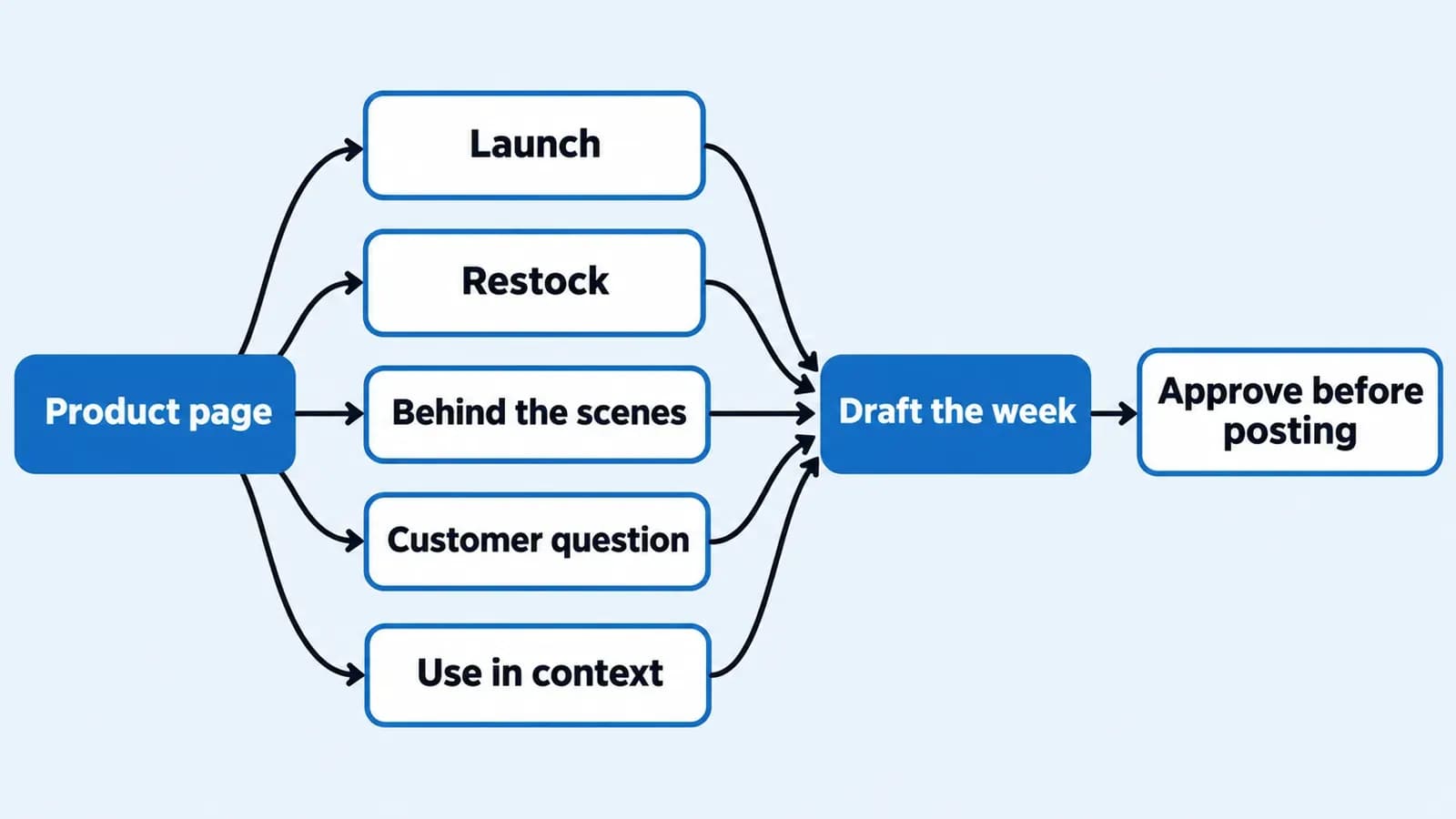
- Sort ideas into five types: launch, restock, behind the scenes, customer questions and use in context.
- Each type needs only a product page, a photo you already have and one plain sentence of purpose.
- Turn one product page into a week by giving each day one idea type and one job.
- Draft the week in one session and read every post before anything goes out.
The easiest Instagram post ideas for a small product brand come from what the shop is selling this week. Sort ideas into five types: launch, restock, behind the scenes, customer questions and use in context. Give each post one job, then turn a single product page into a week of drafts that you read and approve before anything is posted. This article is for owners who run the whole shop and want a short list of ideas they can actually shoot and write.
You will leave with five idea types, a table of prompts for each, a hypothetical worked example and a simple weekly plan. None of it promises reach. It is a way to stop starting from a blank page.
Start from what you are selling, not from "what should I post"
"What should I post?" is a hard question because it has no edges. "What am I selling this week, and what does a buyer need to know about it?" is much easier, because the answer is already on your product page.
Every idea below follows the same shape: one product, one photo you already have, one plain sentence about what the post is for. If a post has no purpose, it is usually the first one to skip on a busy week.
The five types also map to the moments in a small shop's calendar. Something new arrives, something comes back, something gets made, someone asks a question, and someone uses the thing. Those moments repeat, so the ideas do too.
Five types of Instagram post ideas for a product brand
| Idea type | When it fits | The job of the post |
|---|---|---|
| Launch | A new product or variant is ready | Say what it is, who it is for and where to get it |
| Restock | A sold-out item is back | Tell people who asked that it is available again |
| Behind the scenes | Any week, especially a quiet one | Show how the product is made, packed or chosen |
| Customer questions | A question arrives more than once | Answer it once, in public, in plain words |
| Use in context | The product is out of its packaging | Show what the product looks like in a real moment |
Launch posts
A launch post answers three things: what is it, who is it for and how do you get it. Resist the urge to build suspense. A clear post beats a clever one.
Ideas to start from:
- The product on a plain surface with the name, size and one sentence on who it suits.
- A close-up of the detail you are proudest of, with a caption explaining why it matters to a buyer.
- A short note on what changed from the previous version, if there is one.
- A post that says exactly how to order and when the first orders go out.
Use the wording from your product page so the post and the page agree. If the page says something different from the caption, a buyer will notice.
Restock posts
A restock post is for the people who missed out. Keep it short and factual.
- The item, back in stock, with a clear photo and the plain fact that it is available.
- A note on how many you made, only if you are sure of the figure and want to share it.
- A reminder of how orders are handled, so nobody has to ask.
- A follow-up later if the item sells out again, so people know what to expect next time.
If your shop sells food, keep restock wording to what your label already says.
Behind-the-scenes posts
These are the easiest posts to make because the material is already around you. The work itself is the content.
- The table where orders are packed, before the pickup.
- A batch cooling, drying or waiting to be labelled.
- The tools or materials you use, named plainly.
- A day's task list, photographed as it is.
Behind-the-scenes posts work best when they tell a buyer something about the product: why you chose a material, what a step involves, what you check before a parcel leaves. A photo of a mess with no point is a mood, not an idea.
Customer question posts
Your inbox is an idea list. Any question that arrives more than once is a post waiting to be written.
- "Is this suitable for..." becomes a post that answers it with the facts from your product page.
- "How long does delivery take?" becomes a post with the plain answer.
- "What is the difference between these two?" becomes a side-by-side photo with two short captions.
- "How do I use it?" becomes a post that shows the steps.
Remove the asker's name before you post anything that came from a message. Answer the question, not the person.
Use-in-context posts
A product on a white background tells a buyer what it looks like. A product in use tells a buyer what it is for.
- The product on a shelf, a desk, a table or a bag, at the moment it gets used.
- Two products from your shop that sit well together, shown together.
- A wrapped item, shown as a gift, if gifting is a real use.
- A before-and-after of a space or a table that does not claim any result about the product itself.
If your photos are the bottleneck here, how to photograph products at home covers a set-up that works with a phone and a window.
Turn the product page into a week of posts
A product page already holds the raw material for all five types: the name, the description, the questions you answered, the photos and the details you decided matter. Use it as the source for the week.
Here is a routine for one working session.
- Pick one product. Choose what you most want to sell this week.
- Copy the plain facts. Name, size, who it is for, how to order, anything the page already says about care or use.
- List the questions. Write down the three questions about this product that reach your inbox most often.
- Look through your photos. Mark the ones that fit each idea type. A few good photos can cover several days.
- Assign a job to each day. One idea type per post, with one sentence about its purpose.
- Write or draft the captions. Keep to the facts from step 2.
- Read every post and approve it. Nothing goes out until you have read it and agreed.
A tool can speed up steps 2 to 6. Youanai Social builds a Business DNA profile from your website, capturing brand voice and offer rules, and drafts posts from it. Every draft waits for your approval, and you decide what goes out. There is a free way to start.
If you would rather lay the week out on a sheet first, the social media content calendar template for Google Sheets gives you a place to put each idea.
A week at a glance
| Day | Idea type | One-line job |
|---|---|---|
| Monday | Launch | Introduce the product and say how to order |
| Tuesday | Behind the scenes | Show how it is made or packed |
| Wednesday | Customer question | Answer the question that arrives most often |
| Thursday | Use in context | Show the product being used |
| Friday | Restock or reminder | Say what is available and how to order |
This is a starting shape. If you cannot manage five, keep the order and drop the days. Two posts with a clear job each are better than five that repeat each other. If you are unsure about timing, the best time to post for small brands explains how to pick a slot and then test it.
Worked example (hypothetical)
This example is hypothetical. The brand and products are invented to show the method, and it contains no real results.
Imagine a one-person soap shop that has just made a new oat and clay bar. The owner opens the product page and copies the plain facts: the name, the weight, the ingredients list exactly as printed on the label and how to order. No claims beyond the label go into any caption.
The owner then lists the three questions that arrive most often: how the bar compares with the older one, how long a bar lasts and how it is packed for shipping.
The week looks like this:
- Monday, launch. A clear photo of the new bar next to the label, with the name, weight and how to order.
- Tuesday, behind the scenes. The curing rack, with a line on why the bars rest before they are wrapped.
- Wednesday, customer question. Two bars side by side, with one sentence on how the new bar differs from the old one, taken from the product page.
- Thursday, use in context. The bar on a dish by a sink, with no claim about what it does to skin.
- Friday, reminder. A photo of the packed parcel and a note on how orders are handled.
The owner drafts all five in one session, reads each, edits the Wednesday post to match the product page and approves the set. After a week, the owner writes one line per post about what was noticed, such as which post prompted a message. Those notes decide what to repeat next time, with no claim that any idea caused anything.
Keep claims and wording safe
If you sell beauty, food or anything with rules about what you may say, the same care applies to posts as to your product page. Use the wording you already use there. Do not add health or result claims in a caption, even in a casual sentence.
If you are not sure whether a sentence is allowed, leave it out. A plain description of what the product is and how it is used is always enough for a post.
For hashtags that match the content of each post, a small hashtag set for product shops shows how to build one from your product, its use, your community and your place.
Common mistakes with product post ideas
- Five ideas for five different products. A week that focuses on one product is clearer than a week that tours the shop.
- A post with no job. If you cannot say what a post is for in one sentence, skip it.
- Captions that disagree with the product page. Copy plain facts from the page, then add voice.
- Only posting launches. A shop with only launches has nothing to say between them. Use the other four types to fill the gaps.
- Posting without a read-through. Drafting ahead is only safe when an approval step sits between the draft and the post.
FAQ
What are good Instagram post ideas for a small product brand?
Good ideas are tied to what you sell: a launch, a restock, a behind-the-scenes look, an answer to a customer question and the product in use. Each one comes from your product page and photos you already have.
How many post ideas do I need for a week?
As many as you can finish well. Two or three posts that each have a clear job are better than a full week of filler. Start small and add a day when the routine feels easy.
What can I post when I have nothing new to announce?
Behind-the-scenes and customer-question posts need no news. Show how an item is made or packed, or answer a question from your inbox in plain words.
How do I come up with ideas from customer questions?
Read your messages and comments for questions that appear more than once. Each repeated question is a post: answer it with the facts from your product page and leave out the asker's name.
Do I need professional photos for these ideas?
No. A clear photo taken in daylight is enough for most of these posts. Choose one clear picture per post and make sure it shows the product honestly.
Can AI draft my Instagram posts?
A tool can draft captions, but you should read and approve every draft before posting. Youanai Social builds a Business DNA profile from your website and drafts posts from it, and every draft waits for your approval before anything is posted.
How do I make sure a post is ready to go out?
Read it once as a buyer would. Check that it matches your product page, makes no claim you cannot support and says how to order. Then approve it yourself.
Keep reading
How to Get More Views on Instagram: A Weekly Routine

Few views usually trace back to a handful of fixable habits. Check the first line, the idea, the product shown, the rhythm,…

10 min read
Reel vs Story on Instagram: Which One a Small Shop Needs

Use a Story for a quick update, a Reel when there is a short moment worth showing and a feed post for…

9 min read
Best Hashtags for Instagram: A Small Set for Product Shops

The best hashtags for a one-person product shop are the ones that describe the post honestly. Build a small set in four…
10 min read