
Insights
Buffer Alternative for a One-Person Ecommerce Brand
Buffer suits owners who already write their posts. If the blank calendar is the real problem, or you want an approval step without a team plan, here is a fair comparison of six tools and a one-afternoon test.
Aayush Lamichhane
10 min read

In short
- Buffer is a good choice if you already write your posts and want low-cost scheduling per channel.
- Look elsewhere if drafting is the bottleneck, or if you want an approval step without paying for Buffer's Team plan.
- In the Buffer listing read on 19 October 2026, approval workflows are on Team ($10 per channel per month billed yearly), not Free or Essentials.
- Disclosure: Youanai makes Youanai Social, which has fewer networks than Buffer and a costlier flat price if you only need a scheduler.
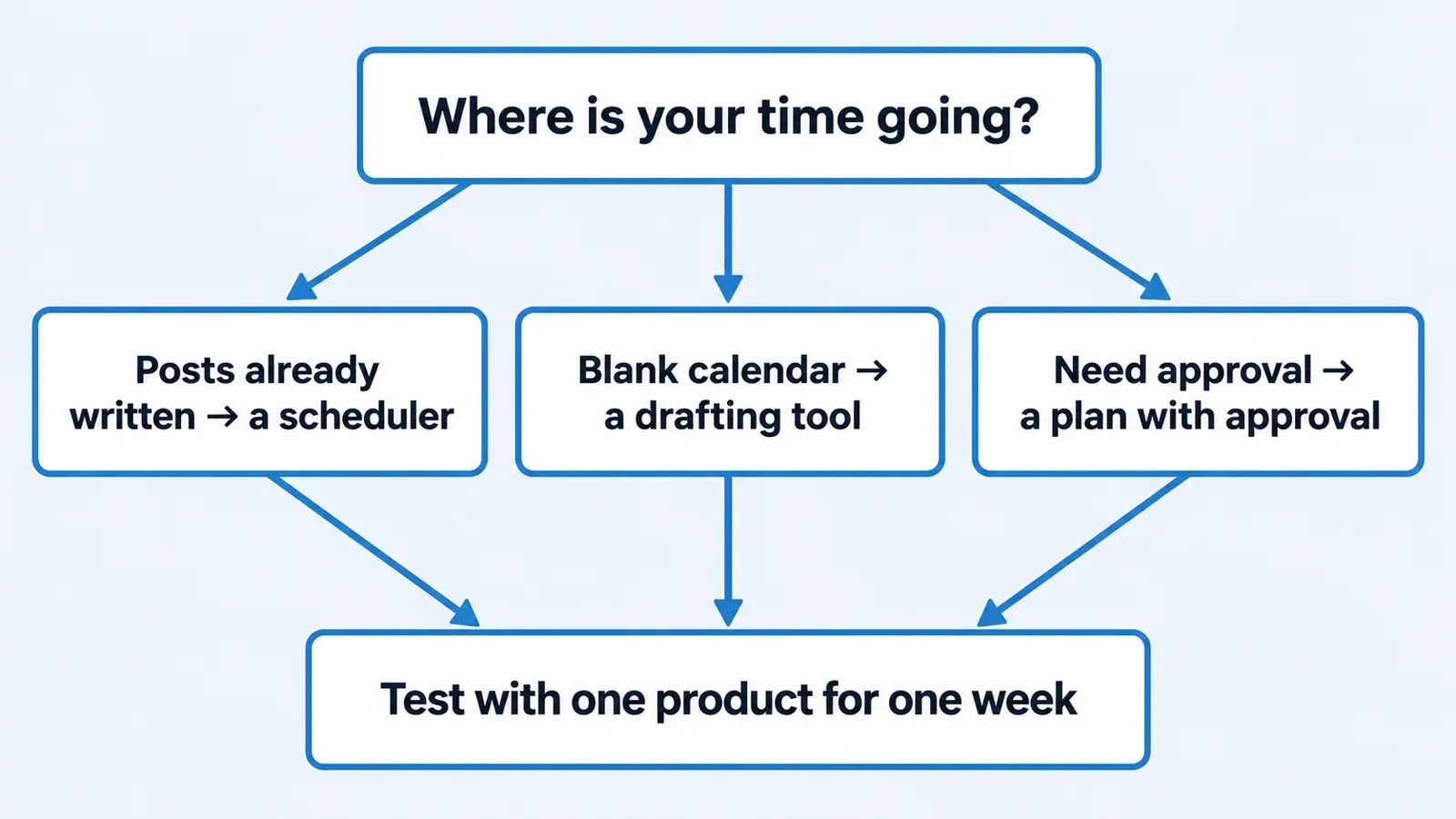
- Test any alternative with one product page: draft a week, approve it, schedule it, and keep your current tool until it works.
Buffer is a good choice when you already write your posts and want cheap, per-channel scheduling. Look elsewhere when the blank calendar and the drafting are the real problem, or when you want an approval step without paying for a team plan. This guide is for the owner of a one-person ecommerce or product brand who is also the marketing team.
Disclosure: Youanai makes Youanai Social, one of the six tools compared below. That gives Youanai a reason to favor it, so every price and feature here comes from each vendor's own pricing page, read on 19 October 2026, with the link next to it. None of these tools was tested hands-on for this article. Prices change, so check each page before you decide.
When Buffer is the right choice
Buffer prices per connected channel, and its plans are Free, Essentials and Team (Buffer pricing). As listed on 19 October 2026:
- Free: $0, up to 3 channels, 10 scheduled posts per channel (refill anytime), 1 user, AI Assistant included, unlimited drafts.
- Essentials: $5 per channel per month billed yearly ($60 per channel per year), unlimited scheduled posts per channel, 1 user, advanced analytics, a hashtag manager and first comment scheduling. There is a 14-day free trial.
- Team: $10 per channel per month billed yearly ($120 per channel per year), unlimited team members, access levels and content approval workflows.
The page also says yearly billing "saves 2 months", so monthly billing costs more than the yearly rates above.
Buffer lists a wide set of networks: Bluesky, Facebook, Google Business Profile, Instagram, LinkedIn, Mastodon, Pinterest, Substack, Threads, TikTok, X and YouTube.
Buffer fits you if:
- You already write captions in a notes app or in your head, and the job is getting them out on time.
- You post to a few channels and want to pay for only those.
- You need a network such as Pinterest, YouTube, Threads, Bluesky or Google Business Profile.
- You are happy to start on the free plan and move up later.
For that owner, Buffer's free plan and $5 per channel Essentials rate are low. Five channels on Essentials come to $25 per month at the yearly rate ($5 x 5, our arithmetic from the listed price).
When to look elsewhere
Three situations push owners to compare other tools.
The calendar is empty, not unscheduled. Buffer lists an AI Assistant on every plan; its pricing page does not say whether it drafts posts from your product pages. A scheduler mainly holds posts you have written. If most of your week goes to staring at a blank box, a better scheduler does not fix the blocker. If that is you, the guide to an empty content calendar for a one-person ecommerce brand covers the cause before you pick any tool.
You want an approval step. Even working alone, some owners like a gate between a draft and a live post, especially if a helper or an AI assistant drafts. In the Buffer listing, approval workflows are on Team, not Free or Essentials. Team is $10 per channel per month billed yearly, so five channels would be $50 per month at the yearly rate (our arithmetic). That may be fine for a team and heavy for one person.
Your products are the content. If every post starts from a product page, a tool that reads your site and drafts from it can save the first step. Of the tools below, Predis.ai lists e-commerce product post and video generators with Shopify, WooCommerce, Wix and Squarespace integrations (Predis.ai pricing). Which plans include them is not stated on the page.
Six tools side by side
All prices are as listed on 19 October 2026. Billing interval matters, so it is in the cell. "Not stated" means the pricing page we read did not say, which is different from "no".
Social scheduling tools for a one-person product brand, as listed on 19 October 2026
| Tool | Starting price | Free plan | Approval workflow | Best fit (from the listed facts) |
|---|---|---|---|---|
| Buffer | Free at $0; Essentials $5 per channel per month, billed yearly | Yes (3 channels, 10 scheduled posts per channel) | Team plan only ($10 per channel per month, billed yearly) | Owners who write their own posts and want low per-channel pricing |
| Later | Starter $18.75 per month, billed yearly | No (14-day trial) | Not in Starter; included in Growth ($37.50 per month, billed yearly); Scale not stated | Owners who want Link in Bio included (Starter) |
| Predis.ai | Core $19 per month (no auto-posting); Rise $40 per month adds auto-posting | No free plan listed (3-day trial with card) | Not stated | Owners who want product post and video generators; plan coverage not stated |
| Postiz | Standard $29 per month ($23 billed annually, 5 channels) | No free plan listed (7-day trial) | Not stated | Not stated; tiers run from Standard to Ultimate at $99 |
| SocialBee | Bootstrap $29 per month | Not stated (14-day trial) | Not in Bootstrap; post approval in Accelerate ($49 per month) | Owners who want approval at a mid-range monthly price |
| Youanai Social | Free at $0; paid $49 per month monthly, or $490 per year ($40.83 per month) | Yes | Every draft waits for the owner's approval before anything posts | Owners who want posts drafted from their website, with approval built in |
Two things the table cannot show. First, these plans count different things (channels, destinations, seats, credits), so the monthly figures are not like for like. Second, other features, such as analytics or Link in Bio on other plans, are not covered unless listed.
A few more details from the pages. Later's Starter is $18.75 per month billed yearly with Link in Bio included, and Scale is $82.50 per month billed yearly. Predis.ai's Enterprise+ is $212 per month. Postiz's higher tiers are Team $39, Pro $49 and Ultimate $99. SocialBee's Pro is $99 per month.
What Youanai Social is, and where it falls short
Youanai Social builds a Business DNA profile from your website, which holds your brand voice and offer rules, then drafts social posts from it. Every draft waits for your approval before anything posts. If you want to see what a Business DNA profile does for voice, read how a Business DNA profile keeps a one-person brand consistent.
What the paid plan lists (Youanai pricing):
- 1 Social workspace, 2 seats, 5 connected destinations per workspace.
- 3,000 shared monthly credits.
- Scheduling and publishing included under fair use, with no separate monthly post quota.
- Destinations: Facebook, Instagram, LinkedIn, TikTok and X (exact account types vary).
- $49 per month billed monthly, or $490 per year ($40.83 per month) billed annually. There is also a free plan at $0.
Where it is the weaker choice, plainly:
- Fewer networks than Buffer. Pinterest, YouTube, Threads, Bluesky and Google Business Profile are not in its listed destinations.
- Buffer's free plan is more generous for pure scheduling. Buffer Free offers 3 channels, and Youanai's free plan is not described here in the same detail.
- If you already write your own posts and only need a scheduler, Buffer is cheaper per channel than Youanai Social, and among the tools compared here, except Postiz Standard ($23 per month billed annually for 5 channels). Five channels at $5 each is $25 per month at Buffer's yearly rate, against $40.83 per month on Youanai's annual price.
So Youanai Social is the better fit only when the drafting and the approval step are the things you are paying to fix.
How to test an alternative in one afternoon with one product
Do not migrate your whole account to learn whether a tool works for you. Run one small test with a single product and keep your current tool running. The steps below use Youanai Social as the method, but the same shape works for any tool on the list.
This is a hypothetical setup: an owner who sells a single scented candle and has a product page with a description, a scent note, a price and a care instruction.
- Pick one product page. Choose the product you most want to sell this month. Check that the page states the offer, the price and anything you promise customers.
- Give the tool your website. In Youanai Social, the Business DNA profile is built from the site, so voice and offer rules come from your own words. With another tool, paste the product description and your voice notes.
- Draft one week. Ask for a week of posts from that one product. For ideas on angles to ask for, see AI social post ideas from what you sell. If you want a worked path from a page to a week, read how a product page becomes an Instagram week.
- Read every draft against the page. Check the price, the scent notes, the care instruction and any claim. Edit or reject anything that is wrong or sounds unlike you. Beauty, food and supplement brands should keep health or result claims out.
- Approve, then schedule. Approve only what you would be happy to post under your name, and schedule those posts. If the tool has no approval step, you are the approval step: read the queue once before it goes live.
- Judge the afternoon. Count how long it took, how many drafts you kept unchanged and how many you rewrote. Then compare against writing the same week in your current tool.
Keep your current tool and its scheduled posts until the test is done. Do not cancel anything on the strength of one afternoon. If the drafts are no better than what you write yourself, you have learned that for the price of an afternoon.
Who should choose which
- Choose Buffer if you write your own posts, want pay-per-channel pricing and need networks such as Pinterest, YouTube or Threads. Its free plan is the easiest place to start.
- Choose Later if Link in Bio matters and you accept paying for Growth ($37.50 per month, billed yearly) to get approval.
- Choose Predis.ai if product post and video generators are the draw. Check that the plan you want includes both the generators and auto-posting, since Core does not auto-post and plan coverage for the generators is not stated.
- Choose Postiz if its Standard tier (5 channels, $23 per month billed annually) fits, and check the page for approval and other features, which it does not state.
- Choose SocialBee if you want post approval at $49 per month (Accelerate).
- Choose Youanai Social if drafting from your own website and an approval step on every draft are the point, and Facebook, Instagram, LinkedIn, TikTok and X cover where your customers are.
If you pick based on the fear of getting it wrong, run the afternoon test on your shortlist of two, not on all six.
FAQ
What is the best Buffer alternative for a small ecommerce brand?
For a small ecommerce brand that writes its own posts, Buffer. If the blank calendar is the problem, test Predis.ai or Youanai Social on one product first. Predis.ai lists e-commerce product post generators.
Is Buffer free?
Yes. As listed on 19 October 2026, Buffer's Free plan is $0 with up to 3 channels, 10 scheduled posts per channel, 1 user, AI Assistant and unlimited drafts (Buffer pricing).
Does Buffer have an approval workflow?
Yes, on its Team plan. In the Buffer listing, content approval workflows are on Team ($10 per channel per month billed yearly), not on Free or Essentials (Buffer pricing).
Which alternatives to Buffer have a free plan?
From the pricing pages read on 19 October 2026, Youanai Social lists a free plan at $0. Later and Predis.ai and Postiz list no free plan, and SocialBee's page, as read, lists a 14-day trial without stating a free plan. Each page links in the table above, and plans change.
Is Buffer cheaper than Youanai Social?
For pure scheduling, usually yes (Buffer is cheaper per channel among the tools compared here, except Postiz Standard at $23 per month billed annually for 5 channels). Buffer's Essentials is $5 per channel per month billed yearly, so five channels are $25 per month. Youanai Social is $40.83 per month on its annual price for 5 destinations, but includes drafting from your website and approval on every draft. Compare the jobs, not only the figures.
Which networks does Youanai Social support?
Facebook, Instagram, LinkedIn, TikTok and X, with exact account types varying (Youanai pricing). It does not list Pinterest, YouTube, Threads, Bluesky or Google Business Profile, which Buffer does.
Can I try an alternative without leaving Buffer?
Yes, and you should. Keep Buffer running, test the other tool on one product for a week, and only change after you have compared the results. The approve-before-it-ships workflow for one-person ecommerce shows how to build the check into any tool.