
Insights
How to Add a Link to an Instagram Story for a Product Drop
The steps take under a minute. The harder part for a small shop is what the sticker says, which page it opens, and when it goes out. A plain plan for a restock or drop, with a hypothetical candle week.
Kushal Shrestha
9 min read

In short
- Open a story, tap the sticker tool, choose Link, paste the URL, tap Done, and place the sticker.
- New accounts and accounts that repeatedly break Community Guidelines may not have the Link sticker.
- For a drop, link the exact product page, check it is live and in stock, and write sticker text that says what happens on tap.
- Link stickers work in organic stories only. Stories ads use a call-to-action sticker, and links in feed captions are not clickable.
- Draft the feed posts around the drop, approve them, then add the stickers in the app.
To add a link to an Instagram Story, open the story camera, add a photo or video, tap the sticker tool in the top bar, choose the Link sticker, paste your URL, tap Done, and place the sticker where people can see it. Tap the sticker to cycle through colour options. This is for owners of small shops who want a restock or product drop to send people to the exact page where they can buy.
The steps are quick. What decides whether the story works is what the sticker says, which page it opens, and whether that page is ready when people tap.
How to add a link to an Instagram Story
Instagram describes one flow that is the same on iPhone and Android, with no separate steps per phone (Instagram: How to Use Instagram Stories). The sticker steps were first set out when Instagram opened link stickers to everyone (About Instagram, 27 Oct 2021).
- Capture or upload a photo or video to your story.
- Tap the sticker tool in the top bar.
- Tap the Link sticker.
- Paste or type the link, then tap Done.
- Place the sticker on the story, and tap it to try the colour options.
- Edit the sticker text if you want it to say something other than the web address. Instagram's guide gives examples such as "shop the look" or "read the recipe".
- Share the story.
When someone taps the sticker, they are redirected to the linked website (Instagram Help Center). Menus can change over time, so if a button has moved, look for the sticker tray first.
Who can use link stickers, and why some accounts cannot
Before 2021, links in stories were limited to verified accounts or accounts over a follower threshold, and the old "swipe up" link has since been replaced by the sticker. Link stickers then became available to all accounts (About Instagram).
There are exceptions. Instagram says new accounts, and accounts that repeatedly share content that violates the Community Guidelines, will not have access to the Link sticker (same source).
| Situation | What Instagram says | What to do |
|---|---|---|
| Established account in good standing | Link sticker is available to all accounts | Follow the steps above |
| Brand-new account | Will not have the Link sticker, per Instagram | Instagram gives no time frame; check the sticker tray again later |
| Repeated Community Guidelines violations | Will not have access to the Link sticker | Review the account's status in the app |
| Sticker missing, no clear reason | Not covered by the sources used here | Check the sticker tray and update the app, then contact Instagram support |
The facts above do not give a waiting period for new accounts, so no number is stated here. If the sticker is missing on an account you run, treat that as something to check in the app rather than something a different link tool can fix.
How a small product brand can use a link sticker for a restock or drop
A drop is a good fit for a link sticker because the reader's next step is clear: see the thing, tap, buy. Five choices make the difference.
Write sticker text that says what happens on tap. A bare web address tells people nothing. Instagram lets you customise the sticker text, with "shop the look" as one of its own examples. For a drop, text like "Shop the restock", "See what is back" or "Get the new scent" names the result. Instagram's help pages do not state a text length limit, so keep it short and test it on your account.
Link the exact product page, not the homepage. The homepage makes a person hunt. If the restock is one candle, link that candle. If it is a collection, link the collection page. This is the same idea as starting a week of posts from one product page, which is covered in product page to Instagram week.
Check the page before the story goes out. Open the link on your phone, not just your computer. Confirm it loads, shows the right item, and the item is actually in stock. A restock story that leads to "sold out" or an error page spends the attention you just earned. For food and similar categories, a restock week for a specialty food brand covers a restock week for food brands.
Do not rely on a single story. One story can be missed. A short sequence gives people more than one chance to see it (see the next section).
Pair the sticker with a Highlight and the bio link. Instagram lets you add up to five links in your bio, as reported when the feature launched (Search Engine Land). Point one bio link at the same product page for as long as the drop runs, so a visitor who arrives after the story still finds it. Highlights are one option. Instagram's help pages do not say how link stickers behave inside Highlights, so open the Highlight on your account and tap the sticker yourself before relying on it.
A simple three-story drop sequence
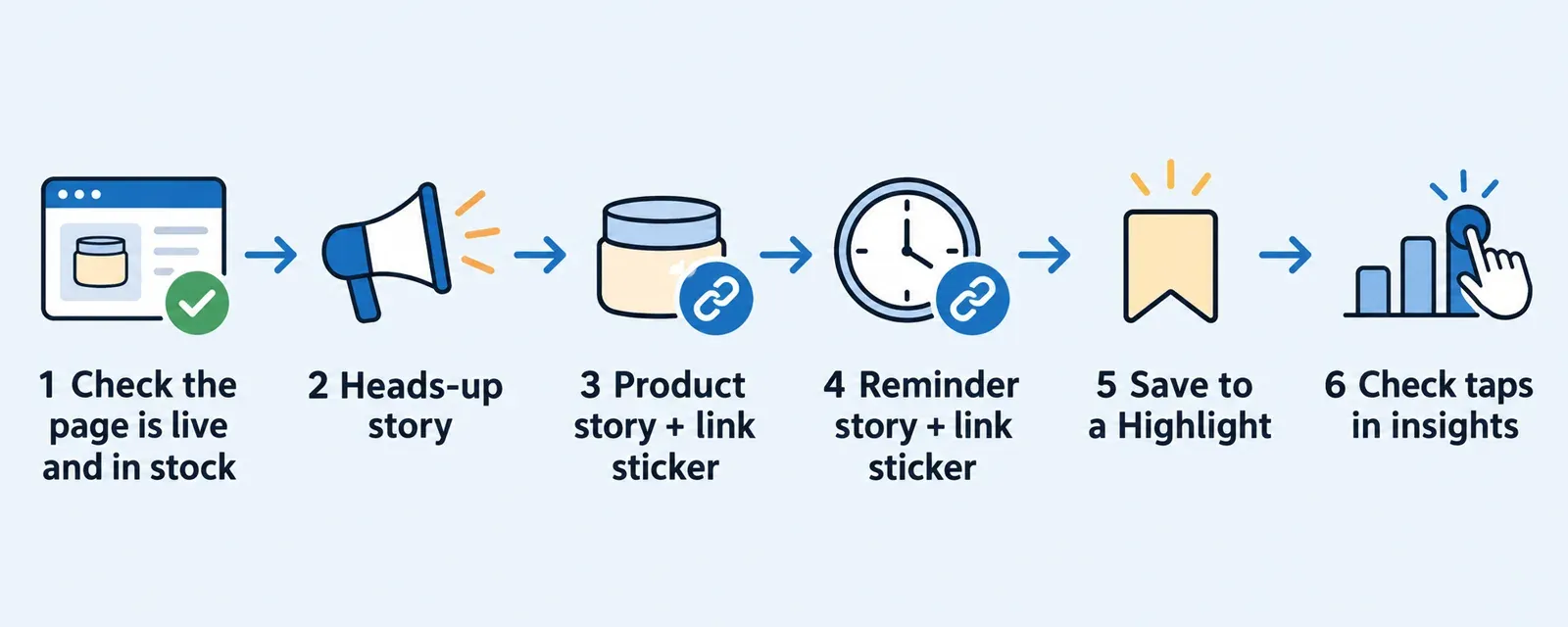
Keep it to three stories. Each has one job.
| Story | Job | Link sticker? | Sticker text idea |
|---|---|---|---|
| 1. Heads-up | Tell people the restock or drop is coming and when | Optional, only if the page is ready | "See what is coming" |
| 2. Product | Show the item clearly and give the reason to care | Yes, to the exact product page | "Shop the restock" |
| 3. Reminder | Repeat the product and point to the page again | Yes, same page | "Still available" (only if true) |
Do not use urgency you cannot back up. If stock is limited, say what is true and leave it there. Use "Still available" only if the page confirms it.
Measure taps in story insights. After the drop, open the insights for each story and look for taps on the link. Instagram's help pages do not name the exact label in the sources used here, so look through the story's insights screen for link-related taps and note which of the three stories got the most. Next time, put more effort into the story that worked.
What link stickers cannot do
Link stickers have limits worth knowing before you plan around them.
- They work in organic stories only. Instagram says link stickers can only be used in organic Instagram Stories. Stories ads use a default call-to-action sticker instead, set in Meta Ads Manager (Instagram Help Center).
- They do not turn into partnership ads. You cannot create partnership ads from stories that carry organic link stickers (same source).
- They do not make feed captions clickable. Links in feed captions are not clickable, so a feed post about the drop should say to check the story or the bio link.
- They are not product stickers. Instagram has a separate help article, "How to add product stickers to Instagram stories", for shops that use Instagram Shopping.- Some limits are unknown. The help pages used here do not state how many link stickers fit on one story. Test it rather than assuming.
Worked example: a hypothetical candle restock week
This is a hypothetical. A small candle brand, run by one owner, has a best-selling scent back in stock on Thursday. The owner wants a calm restock week, and does not want to plan the week's feed posts at the last minute.
- Start from the product page. The owner opens the product page for the restocked scent and confirms it loads on a phone, shows the right photo, and says in stock.
- Build the brand profile. In Youanai Social, the owner starts from the website. Youanai Social builds a Business DNA profile from the site: brand voice and offer rules.
- Draft the week. From that profile, the owner asks for drafts: a teaser on Tuesday, the restock post on Thursday, and a reminder on Saturday. Nothing is posted yet. The owner writes the story text and sticker wording personally.
- Edit and approve. The owner reads each draft, changes anything off-voice, and approves the ones that are right. Every draft waits for approval before anything is posted. For more on that step, see approve before it ships.
- Add the stickers in Instagram. On Thursday, the owner adds the Link sticker in the Instagram app to stories 2 and 3, with the text "Shop the restock", pointing at the scent's product page.
- Update the bio link and Highlight. One bio link is switched to the same page, and the stories are saved to a Highlight called "Restock" (after checking how the sticker behaves there).
- Review taps. On Friday, the owner opens story insights, notes which story drew the most link taps, and records it for the next drop.
If the week would otherwise start from a blank calendar, this guide to an empty content calendar covers getting unstuck.
FAQ
Can everyone add a link to an Instagram Story?
Almost everyone can. Instagram made link stickers available to all accounts in 2021. New accounts and accounts that repeatedly share content that violates the Community Guidelines will not have access (About Instagram).
Why can I not see the Link sticker on my account?
The sources used here give two reasons: the account is new, or it has repeatedly shared content that breaks the Community Guidelines. They give no other cause or time frame. Check the sticker tray and the app version, then contact Instagram if it stays missing.
Are the steps the same on iPhone and Android?
Yes. Instagram's own guide describes one flow for both phones and does not give separate iPhone and Android steps (How to Use Instagram Stories).
Can I change the text on the link sticker?
Yes. Instagram says the sticker text can be customised and gives examples like "shop the look" or "read the recipe". Its help pages do not state a text length limit, so keep it short and test it.
Can I put more than one link sticker on a story?
Instagram's help pages do not state a limit; test it on your account. A single, clear link is usually easier for a reader to act on.
Can I add a clickable link in an Instagram feed post caption?
No. Links in feed captions are not clickable. Use the link sticker in a story, or a link in your bio, and mention that in the caption. Instagram lets you add up to five links in your bio, as reported when the feature launched (Search Engine Land).
Can I use a link sticker in a Stories ad?
No. Link stickers can only be used in organic Instagram Stories. Stories ads use a default call-to-action sticker, set in Meta Ads Manager (Instagram Help Center).